
Introduction
Picking a name at random has never been more engaging than with a random name generator wheel. Enter any list of names, hit spin, and watch the wheel land on a result in seconds — no signup, no download, completely free. Whether someone needs to call on a student fairly, run a live giveaway, or settle a party debate, this free name picker wheel — also known as a wheel of names or random name picker — makes every selection visual, transparent, and genuinely fun.
What Is a Random Name Generator Wheel?
A random name generator wheel is a digital spinning tool that selects one name at random from a list entered by the user. Each name becomes a colored segment on the wheel. When the wheel spins, a cryptographically secure algorithm determines the result before the animation even begins — meaning the outcome is mathematically fair and impossible to predict or manipulate.
Unlike a basic name randomizer that simply outputs text, a spinning wheel adds a visual layer that plain list pickers can’t match. Everyone watching sees the same process unfold in real time, which makes the selection feel transparent and trustworthy — something that genuinely matters in classrooms, live streams, and public events.
The tool runs entirely inside a web browser. There is nothing to install, no account to create, and no features locked behind a paywall. A user types or pastes their list, presses the spin button, and the wheel does the rest. It works equally well on a desktop computer, a tablet projected on a classroom screen, or a smartphone held during a party.
At its core, a name picker wheel solves a simple but surprisingly common problem: how do you choose one name from many in a way that feels fair to everyone involved? The spinning wheel format has become the most trusted answer to that question online.
How to Use the Random Name Generator Wheel
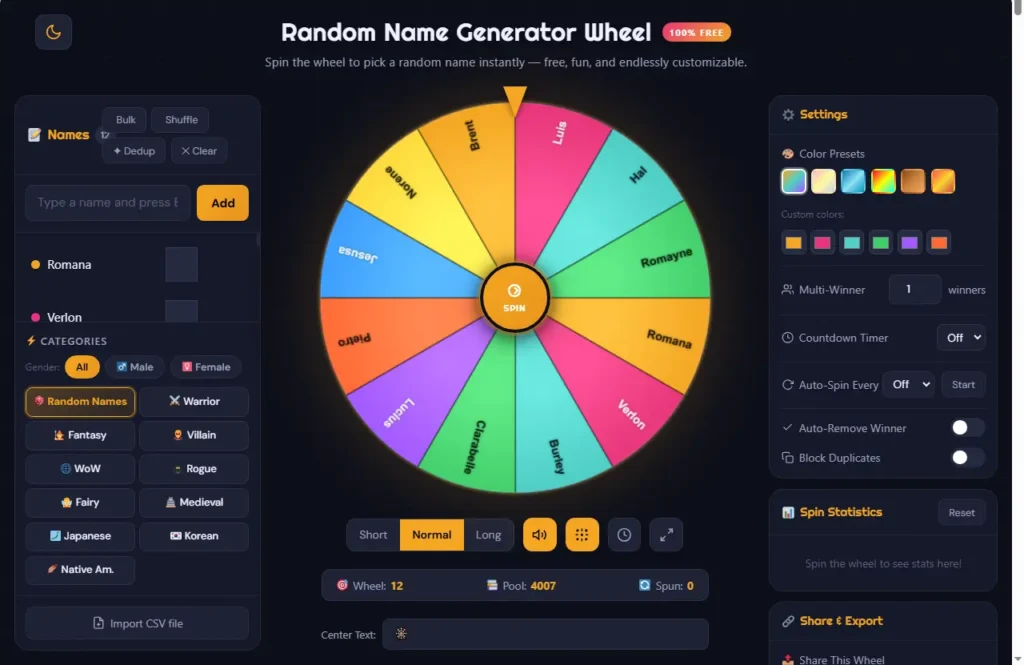
Getting started takes less than a minute. The tool is designed to be intuitive from the first visit, but here is a clear walkthrough for anyone using it for the first time. Educators will find that spinner tools in education enhance engagement and make classroom participation more dynamic.
Step 1 — Enter the Names
Type names into the input panel on the left side of the screen, one name per line. Alternatively, paste an entire list directly from a spreadsheet, document, or contact export. For those who want a starting point without typing, the built-in AI fill feature generates a name list automatically with a single click.
Step 2 — Choose a Spin Mode
Select between Normal mode for a standard spin experience or Speed mode for quicker results. The spin duration can also be adjusted using the timer control — shorter for rapid decisions, longer for dramatic live-event moments where suspense matters.
Step 3 — Customize the Wheel
Each segment color can be adjusted individually to help organize entries visually. The tool also supports a light and dark theme toggle, which is useful for switching between a bright classroom projector environment and a darker streaming overlay setup.
Step 4 — Spin the Wheel
Click the center SPIN button and let the wheel do the work. It rotates through all the entries and slows to a stop on the randomly selected name. The result is determined by the algorithm at the moment of the spin — the visual animation simply reflects that outcome.
Step 5 — View the Winner
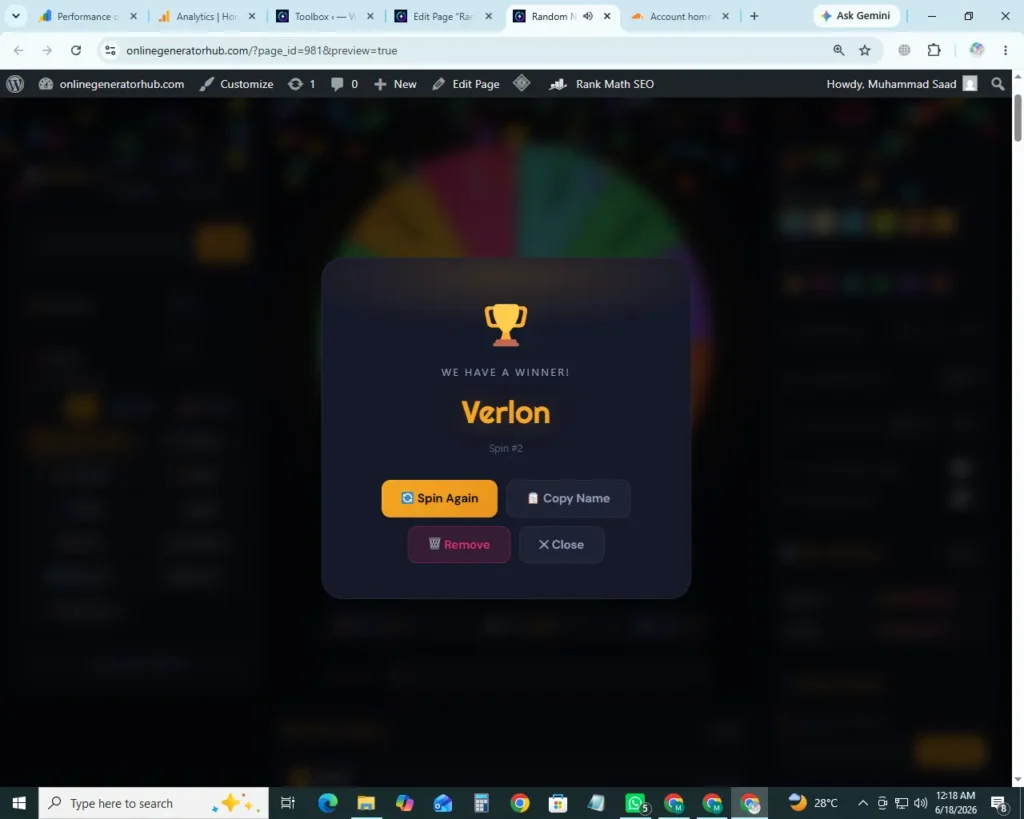
A winner popup appears with the selected name highlighted. A confetti animation fires and a sound effect plays, giving the moment a satisfying finish that works just as well on a classroom screen as it does during a live stream.
Step 6 — Remove or Keep the Winner
After a name is picked, the option to remove that entry from the wheel becomes available. This prevents the same person from being selected again in multi-round sessions such as raffles, classroom participation streaks, or bracket-style events. For use cases where repeat picks are fine, the name stays on the wheel.
Step 7 — Reset and Start Fresh
When the session is over, the list can be cleared with a single click, shuffled into a new order, or replaced with an entirely different set of names. There is no need to reload the page or lose previous settings.
Who Uses a Random Name Generator Wheel?
The range of people who rely on a spinning name picker is broader than most expect. From teachers and content creators to event organizers and writers, the use cases stretch well beyond the obvious.
Random Name Generator Wheel for Classrooms and Teachers
Teachers were among the first communities to widely adopt name picker wheels, and they remain one of the largest user groups today. Calling on students randomly eliminates the perception of favoritism, keeps the entire class alert — since anyone could be next — and adds a small moment of excitement to an otherwise routine activity. Chapman University has published practical tips on using Wheel of Names in classrooms to promote equity and engagement
The tool gets used for more than just answering questions. Educators spin it to assign presentation order, choose classroom helpers, form project groups, and distribute tasks during collaborative activities. The visual nature of the wheel means students watch the process happen openly, which builds trust in the outcome in a way that a teacher simply announcing a name never quite does.
The random name wheel hack has even gone viral across teacher communities on TikTok, with educators sharing how a spinning wheel transforms classroom behavior management. Students who want their name on the wheel pay attention, participate, and stay engaged — the gamification element does a lot of the heavy lifting.
Using a Name Picker Wheel for Giveaways and Contests
For content creators and brand marketers, running a fair giveaway means showing the audience that the selection process cannot be manipulated. A visible spin wheel accomplishes that better than any screenshot of a numbered list.
Whether the giveaway runs on YouTube, TikTok, Instagram, or a website, the approach is the same: paste the list of entrants, spin live, and let the audience watch the wheel land. The visual moment of the wheel slowing toward a name builds genuine suspense that makes for good content on its own. Winners feel the result is legitimate because they watched it happen. For raffle-style events in particular, the spinning wheel has become the most trusted format for live winner selection.
Spin Wheel for TikTok and Live Streaming
Streamers on Twitch and creators on TikTok have found particular value in spin wheels for subscriber and viewer draws. The spinning animation is visually compelling on camera and creates a shareable clip even on its own.
The tool’s dark mode and customizable color themes make it easy for any streamer to match a channel’s visual branding. For streamers running raffles mid-broadcast, the ability to paste a subscriber list and spin immediately — without navigating away from the session — keeps momentum going.
Name Wheel Spinner for Party Games and Social Events
At gatherings of any size, the question of who goes first, who draws a dare, or who wins a prize always needs an answer. A name wheel settles those questions without argument. It works equally well at a small family game night, a large office event, or a wedding reception where guests want a fair door prize draw.
The visual spin and the moment of suspense it creates add something to the occasion that pulling a name from a hat simply cannot replicate — especially when the wheel is displayed on a television or projected screen for everyone to see.
Picking Random First and Last Names with the Wheel
Writers, novelists, game designers, and tabletop RPG players frequently need random character names pulled from a list they have curated. Loading a wheel with a mix of first and last name combinations — or separate lists of each — turns it into a character name generator with a satisfying spin mechanic.
This use case also extends to situations where someone needs a temporary alias for account registration, a stage name for a performance project, or a random persona for creative writing exercises. The wheel picks without bias, which is exactly what those scenarios call for.
Spinning from Your Own Custom Name List
One of the most practical applications is the simplest: pasting a specific, pre-existing list of names and spinning from it directly. Student rosters, employee directories, attendee exports, and subscriber lists all work without any formatting required. The wheel auto-segments based on the number of entries, and the result reflects the full list equally.
Key Features of the Random Name Generator Wheel
The tool is built with a genuine depth of features that sets it apart from simpler spin-wheel tools available elsewhere.
Completely Free with No Signup Required
It is a completely free name picker with no freemium model — every feature on the tool is available from the first visit with no account, no email address, and no subscription tier to navigate. Core features are not locked behind a paywall — it is simply free.
Custom Name Entry and Bulk Paste
Names can be typed individually, pasted in bulk from any source, or generated automatically using the built-in AI name fill feature. This makes it equally suited to a teacher typing ten student names and an event organizer pasting five hundred entrant names from a CSV export.
Spin Duration Control
The length of each spin is adjustable, from a quick two-second pick to a longer, dramatic build suited to live events and streams. This small control makes a significant difference in how the tool feels in different settings.
Winner Removal After Each Spin
Once a name is selected, removing it from the wheel takes a single click. This ensures no duplicate picks across multiple spins — essential for raffles, bracket competitions, and classroom scenarios where each person should only be chosen once.
Ten Pre-Made Name Categories
This tool includes ten themed name categories that make starting a session instant: Random Names, Warrior, Fantasy, Villain, WoW, Rogue, Fairy, Medieval, Japanese, Korean, and Native American. Each category contains hundreds of gender‑filtered names — male and female — so no matter the theme, there is always a relevant list ready to spin. For additional inspiration, you can explore random name generator resources from Montgomery College or learn about how generating random names with R is used in academic research.
Share Your Wheel with a Single Link
Once a custom name list is created, the tool generates a unique, shareable URL. Paste that link to anyone, and they will load the exact same wheel with the same names and weights. This is perfect for teachers sharing a class wheel with substitutes, event organizers sending a giveaway wheel to a co‑host, or streamers letting chat spin their own version.
Export and Import via CSV or TXT
The wheel supports full import and export of name lists. Pull in a roster from a spreadsheet with one click, or export winners to a CSV file for record‑keeping. Bulk operations — add all, replace all, clear all — save time when managing large lists.
Block Duplicates and Auto‑Remove Winners
Two toggleable settings give fine control over repeat selections: *Block Duplicates* prevents adding the same name twice to the wheel, while *Auto‑Remove Winner* automatically deletes the winning name after each spin. Together, they make multi‑round draws completely hands‑free.
Spin Statistics and Winner History
Every spin is logged. The winner history panel shows the last 30 results with timestamps, and the statistics panel builds a live leaderboard of the most frequently picked names. Reset either panel independently without losing the rest of the setup.
Multi‑Winner Mode
Instead of picking a single name, the wheel can select multiple winners in one spin. Perfect for raffles where several prizes are given at once, or for classroom group selection where multiple students are called simultaneously.
Countdown Timer and Auto‑Spin
For live events where dramatic pauses matter, an optional countdown timer ticks down from 3, 5, or 10 seconds before the wheel begins to spin. For unattended draws — like a kiosk or a looping classroom activity — the auto‑spin feature spins the wheel automatically every 5, 10, 30, or 60 seconds.
Light and Dark Mode
A theme toggle switches the interface between a light layout suited to bright classroom projectors and a dark layout that blends naturally into streaming overlays and low-light presentations.
Confetti and Sound Effects
A celebratory confetti animation and accompanying sound effect fire when the wheel lands on a name. These details add the kind of satisfying finish that makes the tool feel polished rather than purely functional.
Fully Mobile-Responsive
The wheel works on any device without requiring an app download. The layout adjusts cleanly for smartphone and tablet screens, making it usable on the go — during an event, in a classroom without a projector, or on a stream managed from a mobile setup.
Save the Wheel as an Image
The exact state of the wheel — colors, names, current angle — can be saved as a PNG image with one click. Great for sharing a snapshot of a giveaway result or including a visual in a presentation.
Is the Random Name Generator Wheel Truly Fair?
This is one of the most common questions people ask before trusting a name picker wheel with something that matters — a classroom selection, a prize draw, or a public giveaway. The short answer is yes, and the reasoning is worth understanding.
The tool uses a cryptographically secure random number generator — the same class of algorithm used in security applications — rather than the standard Math.random() function that many basic randomizers rely on. This means the result is determined by high-entropy data sources at the moment of the spin, making it statistically impossible to predict or reproduce — the definition of a truly unbiased, fair selection process.
The visual animation of the wheel spinning does not control the outcome. The result is calculated first, and the animation is then built to land on that result. This distinction matters because it means the spin cannot be manipulated by stopping the animation early or interfering with the visual display.
One thing worth noting: getting the same name twice in consecutive spins is statistically possible and does not indicate a problem with the tool. True randomness works like a coin flip — past results have no influence on the next outcome. If truly unique picks are needed across multiple spins, the winner removal feature handles that cleanly.
Random Name Generator Wheel vs. Other Name Pickers
A plain text randomizer outputs a result with no visual process attached to it. The result appears on screen, and there is no way for an audience to verify how it was reached. For private decisions, that is perfectly adequate. For any situation involving other people — students, contest entrants, live viewers — it falls short.
A spinning name wheel shows the process. Everyone present watches the same wheel rotate through the same entries and land on the same result. That transparency is what makes it the preferred format for public selections. The audience does not need to take anyone’s word for it because they watched it happen.
Beyond trust, the visual format creates engagement that a text output simply cannot generate. The slowing of the wheel, the moment it approaches the winning segment, the burst of confetti on landing — these details transform a mundane random pick into a shared moment. For classrooms, streams, and events, that difference in experience is significant.
Additionally, many competing tools limit their free tier to a small number of entries, require account creation, or restrict customization features to paid plans. This tool offers the full experience — custom colors, sound effects, winner removal, AI name fill, ten themed categories, shareable wheels, multi‑winner mode, and adjustable spin duration — at no cost and without registration.
Frequently Asked Questions
Is the random name generator wheel free to use?
Yes, entirely. There are no subscription tiers, hidden fees, or locked features. Every capability the tool offers is available from the first visit without creating an account.
How many names can be added to the wheel?
The wheel handles lists of any practical size. It auto-adjusts segment sizing based on the number of entries, so both small groups and large event lists work without any manual configuration.
Can the wheel be used for a live giveaway or contest?
Absolutely. Paste the list of entrants, spin with the audience watching, and the winner is selected in full view. The visual spin makes it well-suited to TikTok, YouTube, Instagram, and Twitch giveaways where transparency is expected.
Does the wheel remove the winner’s name after spinning?
It can. The winner removal option appears after each spin. Activating it removes that name from the wheel so the same person cannot be selected again in subsequent rounds — which is the standard approach for raffles and multi-pick scenarios.
Can it generate random first and last names?
Yes. A list of first and last name combinations can be entered manually, or the AI fill feature can generate a full name list automatically. This makes it useful for writers, RPG players, and game designers who need random character names quickly.
Does it work on mobile devices?
Yes. The tool is fully mobile-responsive and runs in any modern smartphone or tablet browser. No app download is required.
Is it possible to use the wheel for classroom activities without a projector?
Yes. While the tool works best when displayed visibly to a group, it functions equally well on a single screen. The result can be shown after the spin rather than during, depending on the setup.
Can the same name come up twice in a row?
It can, because each spin is a fully independent random event — previous results have no influence on the next outcome. To prevent repeat selections entirely, simply remove the winner from the wheel after each spin using the built-in removal feature.
How is this different from a basic online randomizer?
A standard randomizer outputs a result with no visible process. A name picker wheel shows the selection happening in real time, which makes it transparent, fair-feeling, and significantly more engaging for group settings, live events, and streamed content.
Does the wheel work for picking team names or group assignments?
Yes. Entering team names or group options instead of individual names turns the wheel into a team assignment picker. It works for classroom group formation, office team draws, and party game team selection equally well.
What are the ten pre‑made name categories?
The tool includes: Random Names, Warrior, Fantasy, Villain, World of Warcraft, Rogue, Fairy, Medieval, Japanese, Korean, and Native American. Each category contains hundreds of male and female names, with gender filters for quick refinement.
How does the shareable wheel link work?
After creating a custom name list, click the *Generate* button in the Share & Export panel. A unique URL appears. Anyone who opens that link will see exactly the same names and weights you created — no extra setup required. This is especially useful for teachers, event coordinators, and streamers who want others to spin the same wheel.
Can I spin more than one winner at a time?
Yes. Use the Multi-Winner setting to choose between 1 and 50 winners per spin. The wheel will display all selected names in the results modal, making it ideal for raffles with multiple prizes or classrooms calling several students at once.
The Bottom Line
A spinning name wheel brings something that no plain randomizer can offer: a visible, shared, and genuinely exciting selection process. Whether it is a teacher keeping a classroom on its toes, a creator rewarding a loyal audience, or a host making a party game feel fair, the result lands with a level of credibility and entertainment that a simple text output never matches.
The tool here is free, requires no account, and covers every use case from quick one-off picks to large-scale multi-round raffles. Enter a list, spin the wheel, and let it do exactly what it was built to do.
For more name generation tools, explore the Fantasy Name Generator or try the Yes or No Wheel for quick binary decisions.