
Introduction
Ever been halfway through typing x² and realized — wait, how do I actually type that floating 2? Or maybe you’re fixing up your Instagram bio and want something different from everyone else’s boring text. But there’s no superscript button on your keyboard.
So you stop what you’re doing, Google it, find some keyboard shortcut that only works in specific programs, try it, fail, try again. Five minutes wasted on something that should take two seconds.
That’s exactly why this tool exists. Type what you want, and it converts everything to superscript, subscript, small caps, and other styles. Copy it, paste wherever — Instagram, Discord, homework assignments, doesn’t matter.
No downloads. No account. Just instant text conversion that actually works.
How to Use This Superscript Generator
Takes about 30 seconds to figure out.
Type Your Text
Start typing in the input box. One word, a whole paragraph, doesn’t matter. Need placeholder data for testing? A random birthday generator pairs well for form testing — no character limit. Just type naturally and let the tool handle the rest.
Watch It Convert Automatically
No convert button needed. As you type, five different versions appear below instantly. This lets you see exactly how text will look before copying anywhere, and makes experimenting with different phrasings easy.
Pick Your Style
Eight options show up:
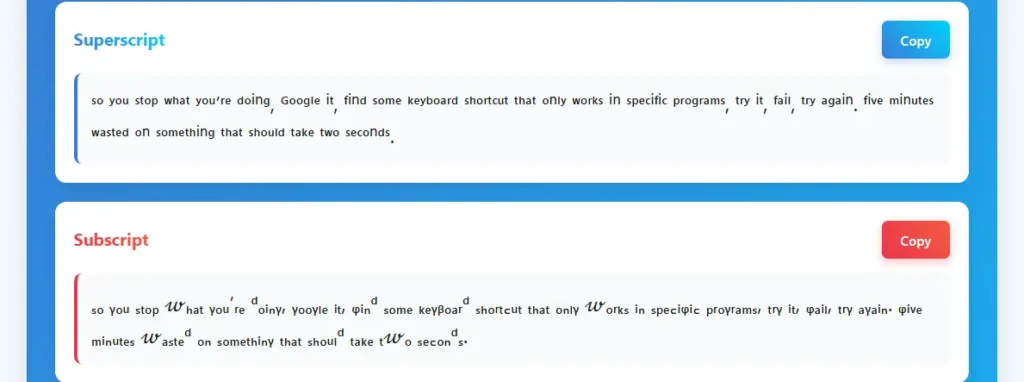
Superscript — Text floats above the baseline. For exponents, math, footnotes, and trademark symbols.
Subscript — Text drops below the baseline. Chemical formulas, array indices, sequences.
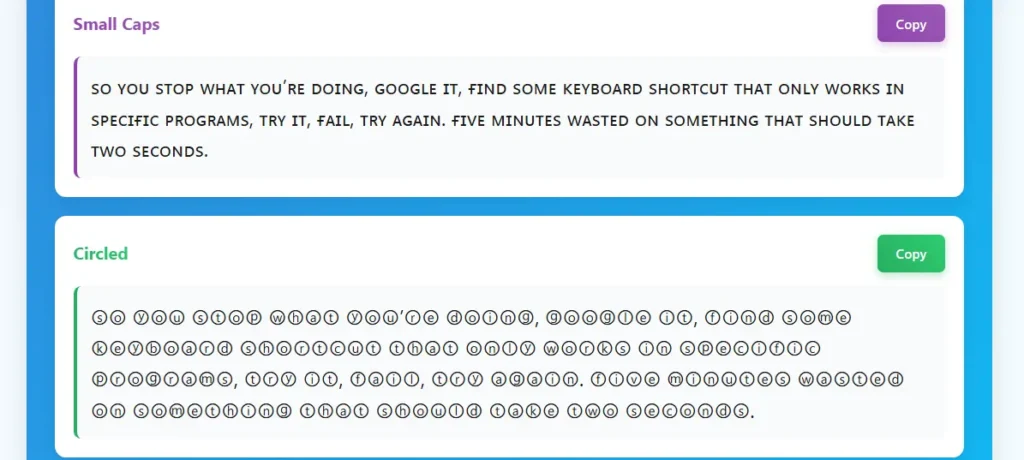
Small Caps — Lowercase becomes smaller uppercase-style. That refined typography look from fancy logos.
Circled — Each character wrapped in a circle. Numbers become ①②③, letters become ⓐⓑⓒ. Great for lists.
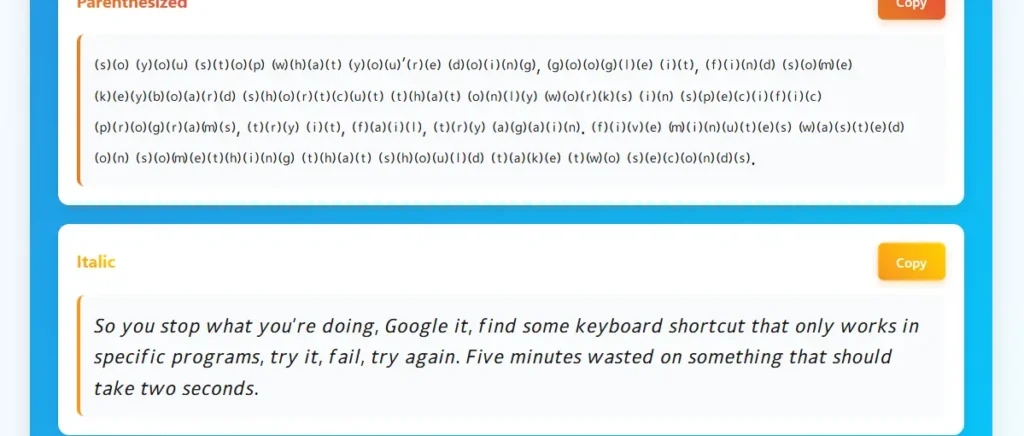
Parenthesized — Uses parentheses instead ⒜⒝⒞. Less common, more distinctive.
Italic — Text converts to Unicode italic characters. Works on platforms that strip normal italic formatting — Instagram bios, Twitter, Discord — anywhere HTML styling doesn’t survive the paste.
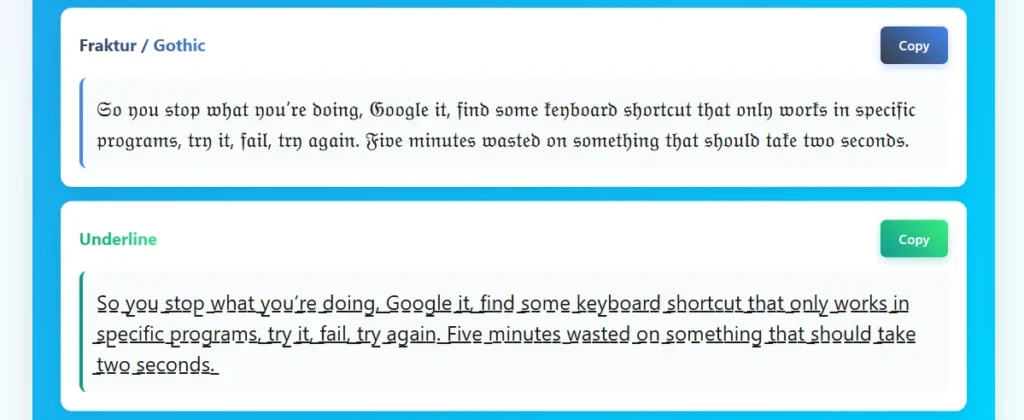
Fraktur — Transforms text into a bold, Gothic blackletter style. Popular for decorative social media profiles, artistic headings, and anywhere you want a medieval or dramatic look, it works great alongside a medieval name generator. Pair it with a villain name generator for the perfect dark aesthetic.
Underline — Adds an underline beneath each character using a Unicode combining mark. Unlike HTML underlines, it survives copy-pasting into plain-text fields and social media.
Copy and Paste
Each style has a copy button. Click once, paste anywhere. One click, ready to go — no highlighting or right-clicking needed. Mobile users especially appreciate this since selecting text on touchscreens can be finicky.
Quick Tips
Works with all English letters, numbers 0–9, and standard math symbols. Some characters don’t have perfect Unicode matches, so the tool uses the closest alternatives — they look fine.
Spacing matters for math. “x2” versus “x 2” with a space gives different results. Capitalization also affects output in some styles, so try both to see what looks better.
What is Superscript?
Superscript is text that floats above the normal line. That tiny “2” in x², footnote numbers in books, the little ™ next to brand names — all superscript.
This tool uses Unicode characters, which means the formatting can’t break or disappear when you paste it somewhere else. These are actual characters that naturally look like superscript — not temporary styling.
Think about normal formatting. Bold text in Word loses its bold when pasted into a plain-text editor. Unicode is different. The characters themselves ARE the formatting. Copy into Instagram, then Discord, then email — looks identical everywhere.
Why People Actually Need This
School Work and Homework
Math homework without proper exponents just looks wrong. Writing “2 to the power of 3” instead of 2³ wastes time and loses points. Chemistry gets messier — H₂O typed correctly shows you understand the material. H2O just looks lazy. Physics equations, footnotes, and lab reports. For creative writing assignments, a random character trait generator can help build your characters. — Proper notation matters, and teachers notice.
Business and Professional Stuff
1st place” versus “1ˢᵗ place” in a report — one looks rushed, the other looks intentional. Brand protection needs legal symbols too. A product name without ™ is missing part of its trademark protection. These aren’t decorative — they carry legal significance. Presentation slides, email signatures, marketing materials — proper formatting reflects attention to detail that clients and executives notice.
Social Media
Instagram bios give you 150 characters and zero native formatting options. You can’t bold or italicize anything. But Unicode works, which means superscript and styled text work fine. That’s how some profiles look more interesting than others — just different characters, not complicated tricks.
Twitter, LinkedIn, TikTok, Reddit. For multilingual profiles, a Japanese name generator can complement your styled Unicode text beautifully.— same deal. Technical discussions benefit from precise notation. Professional profiles look more credible. Creative posts grab attention in fast-scrolling feeds. Try pairing styled text with an ambigram generator for extra creative flair.
Tech Documentation
GitHub READMEs, Stack Overflow answers, API docs — developers need to show Big O notation properly. O(n²) communicates clearly. “O(n squared)” is just wordy. Proper notation prevents misunderstandings that lead to implementation errors.
Why This Tool Works Better
Most generators do one thing — superscript. This one does five conversions at once, visible simultaneously. Maybe you planned on superscript, but notice small caps look better. Having all options right there speeds up the decision.
Real-time preview means zero guessing. Traditional converters make you type, click convert, check, adjust, convert again. This eliminates all those extra steps.
Unicode-based is why it works everywhere. Not CSS tricks or app-specific formatting — legitimate characters every device recognizes. Windows, Mac, iOS, Android — identical results everywhere.
Runs in your browser. Nothing to install. Works on phone, tablet, and computer. Your text never leaves your browser either — not stored, not logged. Everything processes locally.
No ads. No account. Fast performance. Instant conversion regardless of text length. Clean interface, nothing in the way.
How Unicode Makes This Work
Unicode is a massive catalog where every character — letters, numbers, symbols, emoji — gets a unique identification code. Every device worldwide uses the same system.
Before Unicode, different computer systems used different character encodings, and text from one system might display as gibberish on another. Unicode fixed this with one universal standard.
When you use this generator, you’re swapping normal characters for different characters that already look like superscript. Regular ‘a’ is one character. Superscript ‘ᵃ’ is a completely different character. That’s why it survives copy-pasting — the character itself carries the appearance inherently.
Where It Works
Because Unicode is universal, it works on:
Social media — Instagram, Facebook, Twitter, TikTok, Reddit, Discord, LinkedIn Messaging — WhatsApp, Telegram, Slack, iMessage, Signal Documents — Word, Google Docs, Pages, LibreOffice Email — Gmail, Outlook, Yahoo, ProtonMail Websites — basically anywhere text appears
Only very old software from the 90s struggles with Unicode, and that’s rare now.
Different Ways to Make Superscript
Unicode generators (this tool) — work everywhere instantly. The only method that guarantees correct display across all platforms.
HTML uses <sup> tags for perfect website superscript — useless for social media, where HTML doesn’t render.
Word processors have superscript buttons, great for documents — but copy to Twitter and the formatting vanishes completely.
LaTeX gives beautiful results for academic publishing — steep learning curve, specialized software needed.
Markdown sometimes works with x^2^ syntax — inconsistent, platform-dependent.
For social media and cross-platform use, Unicode wins every time.
Frequently Asked Questions
What exactly is a superscript generator?
It converts regular text into superscript Unicode characters. You type normally, it transforms the text, and you copy and paste wherever needed.
Is this completely free?
Totally free. No premium version, no limits, no account needed. Use it as much as you want.
Will this work on Instagram and TikTok?
Works on all social platforms. They all support Unicode — they can’t block it without breaking emoji and international language support.
What’s the difference between superscript and subscript?
Superscript floats above the line (x²). Subscript drops below (H₂O). Use superscript for exponents and footnotes; subscript for chemical formulas and indices.
Does this work on phones?
Works perfectly on all phones and tablets with identical functionality to the desktop.
Can I convert whole paragraphs?
Sure. No character limit. The tool handles short symbols and lengthy passages equally well.
Why do some characters look different?
Some characters don’t have official Unicode superscript versions, so the tool uses close alternatives. Most people never notice.
How do I make trademark symbols?
Type “TM”, “R”, or “C” and convert to superscript for ™, ®, and ©. Or use shortcuts: Alt+0153 for ™, Alt+0174 for ® on Windows.
Does superscript hurt SEO?
No. Search engines handle Unicode fine. Reasonable use of equations and footnotes has zero negative SEO impact.
Tips for Best Results
Don’t overdo it. A word cloud generator can help you visualize which words to emphasize. Heavily styled text gets harder to read. Use it where it makes sense — math, footnotes, emphasis.
Match your audience. Academic papers need correct notation. Social media can be creative. Business emails should stay conservative.
Stay consistent. If you’re marking footnotes with superscript, do all footnotes that way. Mixing styles within one document looks sloppy.
Save templates. If you frequently use specific formatted text, save converted versions in a notes file for quick access.
Wrapping Up
Proper superscript formatting shouldn’t need expensive software or ten minutes of Googling. Whether you’re doing homework, writing research, protecting a brand, or making social media stand out, text formatting matters more than people realize.
This tool gives you five text styles with instant conversion and easy copying. Free, no account, works everywhere, processes everything locally on your device. Type your text, pick a style, and copy the result.
Next time you need x² instead of x2, or want something interesting in your bio, you know where to go.