
Introduction
A stylish name generator turns plain text into decorative Unicode characters. Type “Sarah” and you’ll get back options like 𝓢𝓪𝓻𝓪𝓱, ꧁ SARAH ꧂, or 丂卂尺卂卄, depending on the style you pick. Nothing gets downloaded. There’s no font installed on your device — the tool swaps your regular letters for stylized Unicode symbols that already sit inside every phone and browser’s font library, so no account is needed either.
This particular generator has 1,000+ styles across 19 categories, plus a Platform category built around Instagram, PUBG, Free Fire, Discord, TikTok, and Snapchat specifically, so it’s not hard to find something that’ll actually display the way you want wherever you’re pasting it. People use it for PUBG and BGMI clan tags, Free Fire guild names, MLBB usernames, Kingshot alliance names, Ludo profiles, 8 Ball Pool names, Instagram bios, Discord servers, WhatsApp status, and YouTube channel names — basically anywhere text shows up.
Ever typed your name into a fresh game profile and had it just… sit there, looking plain? That’s really the whole reason this kind of tool exists. A regular username disappears in a lobby full of other regular usernames. A styled one doesn’t.
How to Use Our Stylish Name Generator Online
Okay, using this thing is pretty straightforward. Let me show you how it actually works instead of making it sound more complicated than it is.
Step 1 – Enter Your Text or Name
Click the input box and type whatever you’re working with — your name, a clan tag, a short phrase, doesn’t matter. Styles update as you type. No button to hit, no waiting around for anything to load. Non-English input converts the same way: Hindi, Urdu, Japanese, Chinese all work fine. Don’t have anything specific to type yet? The sample buttons (“Gaming Pro,” “Hello World”) give you something to test against so you can see how the styles look before committing to your own text.
Step 2 – Browse 25 Categories
There are 25 categories, which is more than you’ll want to scroll through in one go, so the whole thing’s built for quick scanning rather than one giant list. On desktop the category bar runs along the top and scrolls sideways — swipe or scroll left to right to see everything. On mobile, tap the categories button and the full list opens up, which honestly works better than trying to swipe through a cramped row on a small screen.
Between the two you’ll land on the same set either way: Aesthetic, Fancy, Gaming, Symbols, Trending, Spacing, Cursive, Bold Italic, Special, Emoji, Cute, Heart, Emoticon, Thank You, Sad, Regional, Platform, Seasonal, and Decorative. If you already know where you’re pasting the name, jump straight to Platform — it groups styles specifically for Instagram, PUBG, Free Fire, Discord, TikTok, and Snapchat.
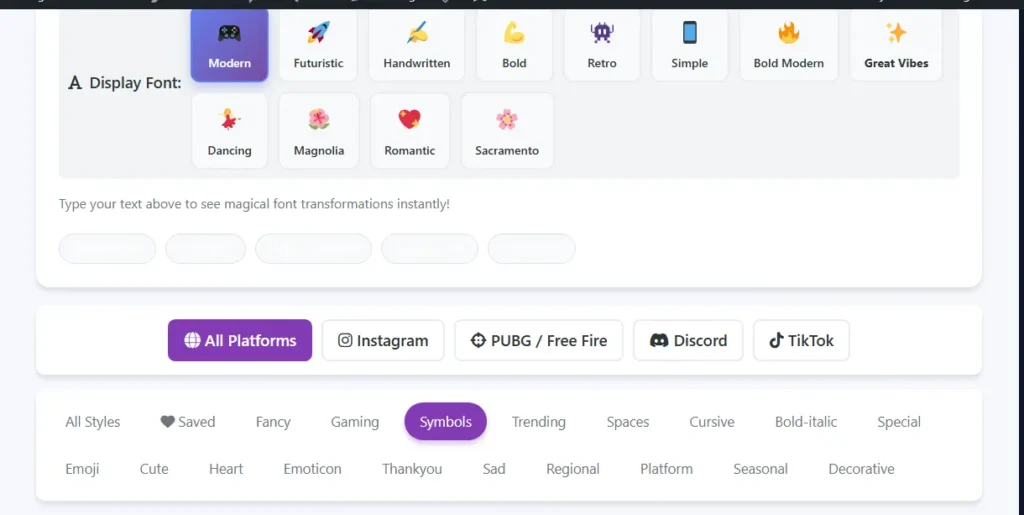
Step 3 – Select Display Font Style
Those 12 little buttons with the emojis? They change the whole look of everything. Click “Modern” and your text gets that sleek vibe. “Futuristic” makes it look all sci-fi. “Handwritten” is more personal and flowy. “Bold” makes everything thicker and stronger. “Retro” gives it that old-school arcade feel. Honestly, sometimes a style looks just meh until you switch one of these fonts, then suddenly it clicks. Worth experimenting with for sure.
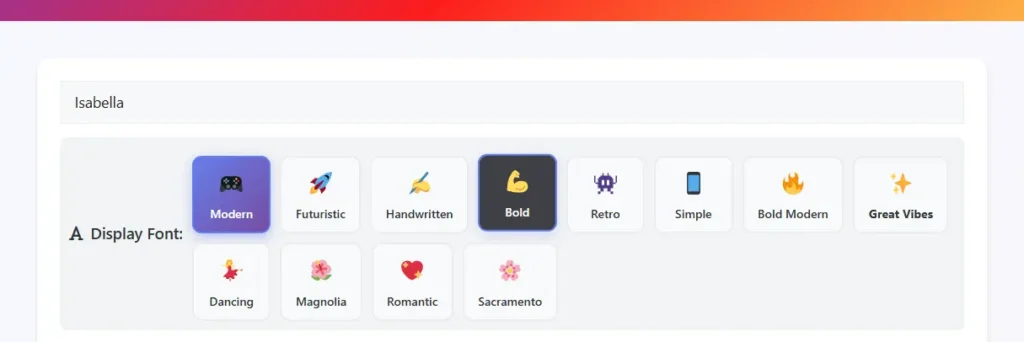
Step 4 – Copy and Paste Your Stylish Name
Found one you like? Click the copy button next to it. That’s literally it. Now go paste it in PUBG Mobile, Free Fire, your Instagram bio, TikTok username, WhatsApp status—wherever you need it. Pro tip: if you really dig a certain style, hit that little star next to it. Saves it to your favorites so you don’t have to hunt for it again next time you’re here. Because scrolling through 400 styles twice? Nobody’s got time for that.
What Is a Stylish Name Generator, and How Does the Text Actually Work?
Worth two minutes of reading, since it explains most of what comes later on this page.
A stylish name generator doesn’t apply a font to your text the way Word does when you switch to Comic Sans. What it’s actually doing is swapping your regular letters for different Unicode characters that already happen to look stylized. Unicode is the character-encoding standard nearly every device and platform relies on, and it covers a lot more than the alphabet you’re reading right now — mathematical alphanumeric symbols, script letters, characters pulled from other writing systems entirely, thousands of them. So when “Hello” turns into “ℍ𝕖𝕝𝕝𝕠,” that’s not a font layered over H-E-L-L-O.
Those are different characters, full stop — ones that happen to belong to the same standard your phone already understands. Unicode’s own site goes deeper into how the standard actually works, if you’re curious.
That’s also why stylish text shows up correctly in places you normally can’t change fonts at all — a PUBG username, an Instagram bio. You’re not asking the platform to render something it’s never seen before. You’re just typing characters it already knows how to draw.
It also explains the one thing that trips almost everyone up eventually: why some characters show up as an empty box. Not the generator breaking, and not a Unicode problem either. It just means the device you’re using doesn’t have the font data to draw that particular character — more common on older or budget Android phones, since manufacturers don’t always bother keeping font libraries current. Recent iPhones and current Android flagships handle nearly all the commonly used stylish characters without a hitch.
And because this is text conversion rather than an app you install, none of it needs your data. The whole thing happens in your browser. Nothing gets stored anywhere, and it works the same whether you’re on a laptop or a phone.
Stylish Name Generator, Name Maker, or Fancy Text Generator — Same Tool, Different Search Terms
Quick thing to clear up before moving on: whether you typed in stylish name generator, stylish name maker, fancy text generator, name generator style, or style name generator, you’re in the right place. These all describe the same kind of tool. People just phrase it differently depending on habit, or which platform they’re using it for — gamers tend to search “name generator,” Instagram users lean toward “font generator” or “bio generator.” Functionally, though, it’s all the same thing: plain text goes in, decorated Unicode comes out.
1,000+ Stylish Font Styles Across 25 Categories
Here’s what’s actually sitting inside each category — not just names that mean nothing until you’ve seen an example.
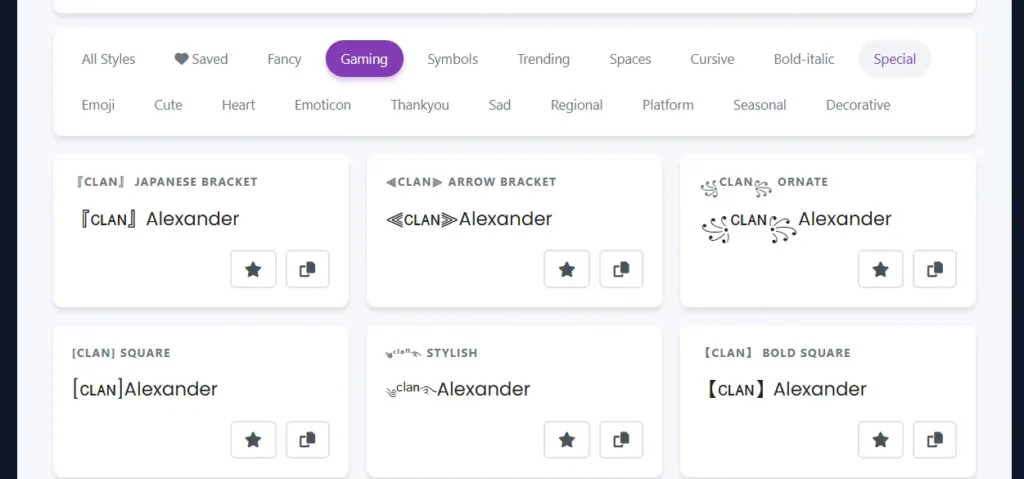
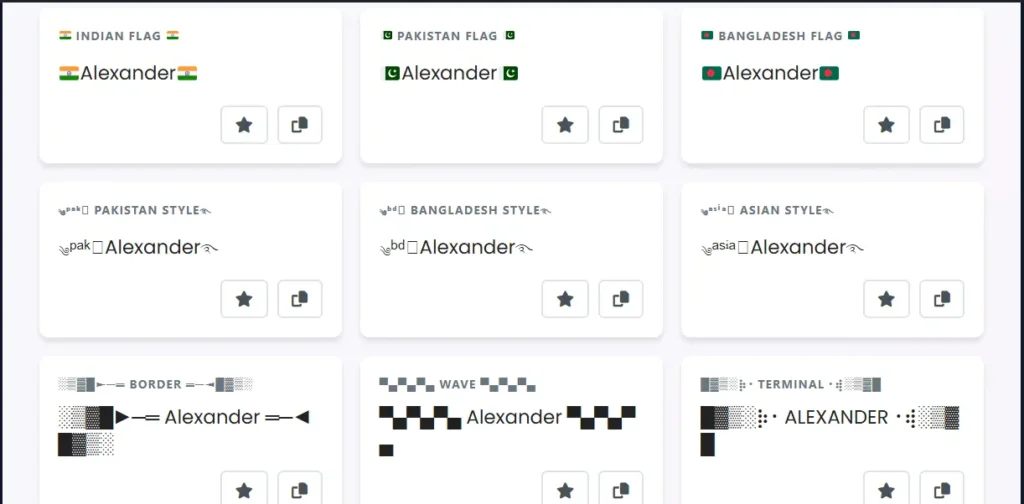
PUBG is a category built specifically for PUBG Mobile and BGMI — clan-tag brackets like 『Clan』 and ꧁༒☬Legend☬༒꧂, the ༄ᶦᶰᵈ᭄King࿐ format, and combat-leaning symbols, narrowed down to what’s known to actually render inside PUBG’s UI rather than the wider Gaming category’s full range.
Free Fire pulls together styles specifically tested against Free Fire’s tighter character limit and rendering quirks — things like 【FF】 tags, 彡ProGamer彡, and guild-tag formats that hold up when you’re down to 12 characters.
Instagram groups styles suited to bios and display names on that platform — softer, more aesthetic-leaning options mostly, since Instagram’s own Unicode rendering can be pickier than a game client’s.
TikTok covers styles built with that platform’s display name and bio fields in mind, leaning toward whatever’s trending on TikTok at the moment rather than the more static gaming formats.
Snapchat is a tighter, shorter set of styles, built around Snapchat’s 15-character display name limit — every character has to earn its place here, so these lean simple rather than heavily decorated.
Discord gathers styles chosen for consistent rendering across Discord’s different client fonts — useful for usernames and server roles where you want something that looks the same for everyone viewing it, not just you.
Aesthetic covers soft, curated styling built for feeds and bios rather than gaming tags. It’s usually the right starting point if you’re chasing a specific mood rather than a specific platform’s requirements.
Fancy includes Bold, Italic, Script, Medieval, Fraktur, and Double Struck. Nothing loud in here — just a step up from plain text, good for a YouTube channel name or an Instagram username where “put-together” is the goal rather than “eye-catching.” Want something more specifically old-English than generally fancy? The medieval name generator goes further into that particular look.
Gaming is probably why most people end up on this page. You’ll find clan-tag brackets like 『Clan』 and ꧁༒☬Legend☬༒꧂, the ༄ᶦᶰᵈ᭄King࿐ format that seems to be everywhere in mobile gaming right now, Free Fire’s 【FF】 tag convention, and the ASCII sniper-rifle build ▄︻デ══━一. It’s built with PUBG, BGMI, Free Fire, MLBB, and Call of Duty Mobile clan tags in mind. Looking for something more villain-coded instead? The villain name generator leans into that tone. For something quieter and stealthier, try the rogue name generator. And if what you actually want is a full battle-ready name rather than just a styled tag, the warrior name generator is built specifically for that.
Symbols gives you stars, hearts, fire, crowns, lightning, diamonds — but organized around placement, not just handed to you as a pile of icons. There’s a real difference between “⭐Alex⭐” and “A⭐L⭐E⭐X,” and this category shows you both options.
Trending tracks whatever’s currently doing numbers on TikTok and Instagram — vaporwave spacing, Y2K-style borders, that kind of thing. This is the category that shifts the most over time, since it’s tied entirely to what’s popular right now.
Spacing handles full-width and spaced-out text, the kind that reads as intentionally airy rather than cramped. Good for headers, or anywhere your text needs a little room to breathe.
Cursive brings script and bold-script fonts that read as more formal. A good fit for artistic YouTube channels, wedding-related content, anywhere “sophisticated” matters more than “loud.”
Bold Italic is exactly what it sounds like — a combined weight-and-slant style for text that needs to stand out without going fully decorative.
Special is where circled, squared, bubble, upside-down, subscript/superscript, and glitch-style text all live. Mostly a Discord thing, since usernames there tend to reward uniqueness over readability.
Emoji is built around emoji-based combinations rather than plain symbols — useful when you want the name to actually carry an expression, not just decoration.
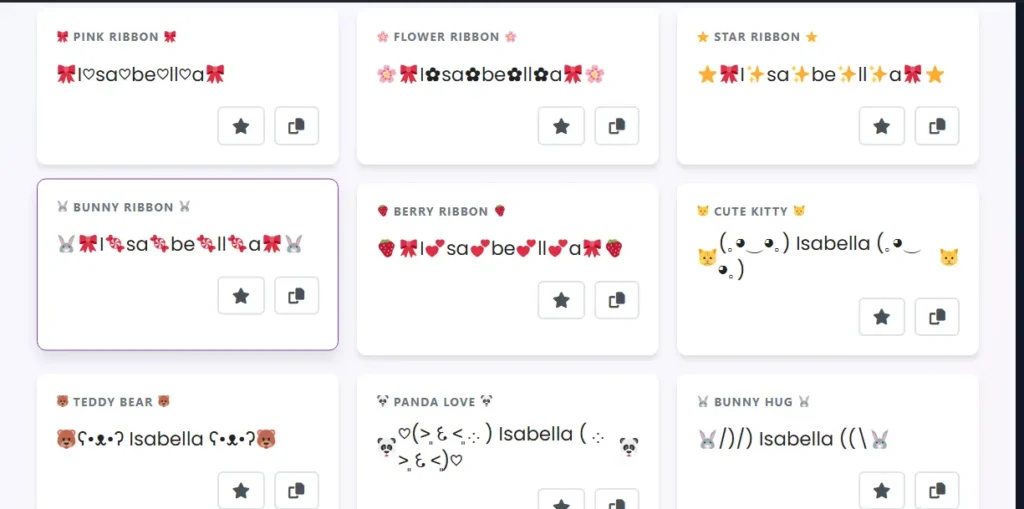
Cute has ribbons, flowers, soft pastel-leaning fonts, paired with animal emoticons. Popular for Instagram bios and WhatsApp status when “sweet” is the goal rather than “intimidating.” If you want something a bit more whimsical and fantasy-leaning, the fairy name generator takes that further.
Heart is a dedicated set of heart symbols and heart-wrapped styles — couple bios, anniversaries, anywhere romantic works.
Emoticon covers classic text emoticons like (。◕‿◕。) and ( ͡° ͜ʖ ͡°), kept separate from Emoji since these are built from characters rather than actual emoji glyphs.
Thank You has preset phrasing and styling built around gratitude posts, shout-outs, follower milestones.
Sad leans into more subdued, low-key aesthetics — for when the vibe you’re going for isn’t exactly upbeat.
Regional is built specifically for Hindi (Devanagari), Urdu, Japanese, Korean, Chinese, and Arabic scripts — not just English text with a few symbols stuck around it. Want a dedicated tool built around a specific culture’s naming conventions instead of decorated script? The Korean name generator and Japanese name generator are built for exactly that.
Platform is a dedicated set of styles built around specific social and gaming platforms — Instagram, PUBG, Free Fire, Discord, TikTok, Snapchat. If you already know where you’re pasting, this is the fastest way to skip straight to styles known to work there.
Seasonal covers Birthday, Christmas, New Year, Diwali, Eid, Valentine’s, and graduation. For anyone who likes their profile to match whatever’s actually on the calendar.
And Decorative rounds things out with general ornamental styles that don’t fit neatly anywhere else — brackets, borders, framing elements you can pair with any of the styles above. Want something more visually experimental? The ambigram generator creates words that read the same upside down, which works surprisingly well for tattoo designs or a logo that needs to stand out.
Best Stylish Names for Popular Platforms
Not every style works everywhere. Some platforms are picky about which Unicode ranges they’ll actually render, and character limits vary more than most people expect going in.
Instagram Stylish Name Generator
Instagram treats your @handle and your display name pretty differently. The searchable @handle only takes plain letters, numbers, underscores, and periods — no Unicode there at all. Your display name and bio, on the other hand, accept almost the full Unicode range, and bio caps out at 150 characters, which goes fast once you start adding decoration. Aesthetic, Symbols, and Cursive tend to work best on Instagram specifically; cluttered styles work against you on a platform that’s really built around visual clarity. Instagram’s help documentation covers the technical limits straight from the source if you want to double-check.
Instagram’s bio is where you can really go wild. Character limit is 150, which sounds like a lot until you start adding decorations. Then it disappears fast. Here’s what actually looks good:
PUBG Name Generator & BGMI Stylish Names
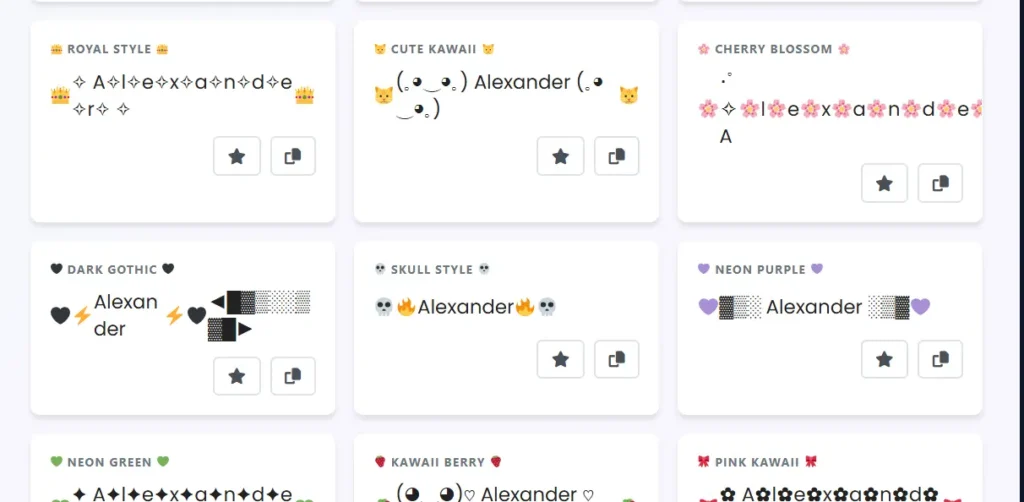
PUBG Mobile and BGMI share the same character support, so a style that works in one works in the other too. Reliable formats include ꧁༒☬Killer☬༒꧂, ༄ᶦᶰᵈ᭄Legend࿐, and simpler brackets like 『ᴘʀᴏ』Name. Renaming costs a card — one free, then it’s UC or grinding events — so pasting your new name into in-game chat before committing is worth the thirty seconds it takes. A handful of the rarer, more decorative characters render as boxes specifically inside PUBG’s UI, even when they show up fine everywhere else. PUBG Mobile’s official site covers the current rename mechanics if you need the specifics. Check out our best PUBG category with 150+styles.
FF Name Generator: Free Fire Stylish Names & Guild Tags
Free Fire developed its own naming conventions somewhat separately from PUBG’s. Common formats that hold up: 【FF】Elite, 彡ProGamer彡, and ꧁༺Legend༻꧂. Guild tags matter a lot here — a squad running matching styles reads as noticeably more organized than four unrelated names that just happened to queue together. The character limit is stricter than PUBG’s, too: 12 characters, hard cap, and some Unicode characters actually count as two against that limit. Renaming costs diamonds or an event card. Garena’s Free Fire site has the current rename costs listed. The tool has a dedicated Free Fire category for you.
MLBB Name Generator: Mobile Legends Stylish Names
Mobile Legends: Bang Bang supports roughly the same Unicode range as PUBG and Free Fire, so gaming brackets and symbol wraps generally display just fine. Double-struck and script variants tend to be the safest bet for consistent rendering, since MLBB has a pretty wide install base spanning older and newer phones alike.
Kingshot Name Generator
Kingshot is a strategy and survival game from Century Games where you play as a Governor — building up a town, forming alliances, defending against rebel invasions. Alliance and player names carry real weight here, the same way clan tags do in battle royale games. A name that’s easy to recognize helps allies pick you out fast during a coordinated attack or defense.
Styled names are still less common in Kingshot than in PUBG or Free Fire, simply because it’s a newer game, which actually means a well-chosen one stands out more right now than it would in a more saturated game. Same rule applies regardless, though: paste it into the in-game rename field first and check it displays the way you’re expecting.
Ludo Name Generator
Ludo apps generally support the same Unicode range as standard messaging apps, so simple bracket and symbol styles hold up fine across most devices. Ludo tends to get played casually with friends and family rather than competitively, so shorter, easy-to-read styles usually work better than something heavily decorated that’s hard to make out at a glance.
8 Ball Pool Stylish Name
8 Ball Pool supports standard Unicode styling in profile names. Since you’re often matched against strangers rather than a coordinated team, a name that’s memorable and quick to read tends to serve you better than one buried under symbols. Simple gaming or symbol-category styles do the job well here.
Discord Stylish Name Generator
Discord supports Unicode broadly, but what actually renders depends on the fonts installed on the viewer’s device, not yours. A heavily decorated name can look totally fine on your end and show up as boxes for someone on an older phone. Script and bold fonts tend to be the most consistent across devices. Server roles can be styled too, which helps organize a community visually, but keep them legible — people scan role lists quickly and don’t want to squint. Discord’s support documentation covers rendering specifics in more detail. Our Discord category covers 100+ styles, so you can create one for yourself easily.
TikTok Stylish Name & Bio Generator
TikTok’s search depends on your actual username being typeable and findable. If it’s pure decorative Unicode, people searching for you by hand simply won’t find you. The workaround’s straightforward: keep your @handle plain and put the styling into your display name and bio instead, where searchability isn’t really a factor. The tool has a TikTok category for you.
Snapchat Stylish Name & Display Name Generator
Snapchat splits identity into two parts — a permanent username you can’t change, and an editable display name capped at 15 characters. Given how tight that limit is, Aesthetic, Cute, and Symbol styles tend to fit better than longer script-heavy options, since every single character has to earn its place. Our Snapchat category covers all trending snapchat styles.
WhatsApp, Facebook & YouTube Channel Names
WhatsApp status caps out at 25 characters, and heavier decoration eats through that fast, so simplicity wins there. Facebook allows 50 characters for a profile name but reviews names against a “real name” policy, so it’s safer to go lighter on symbols for a main account. YouTube channel names also cap at 50 characters — gaming channels tend to benefit from bolder styling, while educational or vlogging channels usually read better with cleaner text. YouTube’s Creator Academy has more on channel branding if you’re building out a full identity rather than just picking a name.
Game Name Style Font & Symbol Combos
A few specific searches come up often enough that they’re worth addressing directly.
Game name style font usually means someone’s after a particular visual treatment rather than a particular platform — bold, gothic, or double-struck applied to a gaming tag. These live in the Gaming and Fancy categories and generally work across PUBG, Free Fire, MLBB, and most other mobile titles without any platform-specific restrictions.
Game name generator with symbols is about combining a font style with actual decoration — brackets, blades, skulls, lightning wrapped around the name itself. The Symbols category is built for exactly this, with placement options rather than just a flat list of icons.
Gaming font style name and stylish name generator ff both point to roughly the same thing: gaming-specific fonts filtered down to what actually renders correctly in mobile shooters. The Platform category solves this directly — it’s the fastest way to skip past styles that won’t display right in those particular games.
Key Features of This Stylish Name Generator
- Live preview that updates as you type, no button to click
- One-click copy with an on-screen confirmation
- A dedicated Platform category for Instagram, PUBG, Free
- Fire, Discord, TikTok, and Snapchat\
- 25 organized categories instead of one long unsorted list of 1,000+ styles
- 12 display fonts that restyle the whole page without changing the underlying Unicode
- Favorites system for saving and comparing styles side by side
- Completely free — no account, no email, no paid tier
- Works on mobile and desktop, including right-to-left and multilingual scripts
Character Limits by Platform
| Platform | Limit |
|---|---|
| PUBG Mobile | 12–14 characters recommended (gets cut off in the UI beyond this) |
| Free Fire | 12 characters, hard limit — some Unicode counts as 2 |
| 30 characters (username) / 150 (bio display name) | |
| TikTok | 24 characters (display name) |
| Discord | 32 characters (username) |
| Snapchat | 15 characters (display name) |
| 25 characters (status/profile name) | |
| Facebook / YouTube | 50 characters |
Some platforms count certain Unicode characters as more than one character against the limit. If a name gets cut short unexpectedly on save, that’s usually why — try trimming a symbol and testing again.
Tips for Choosing the Right Stylish Name
Keep it readable. Two or three symbols is usually the ceiling before a name stops being stylish and turns into a puzzle someone has to sit there and solve.
Match the tone to the platform. Gaming names can afford to be sharp — skulls, lightning, bold brackets. Instagram tends to reward softer choices instead — scripts, hearts, gentle symbols. A professional or business account, meanwhile, usually does better staying clean and understated.
Combine elements instead of copying a preset exactly as-is. A script font plus one symbol that actually means something to you personally reads as far more original than being the fifteenth person this month using the same viral bracket format.
Watch for trends that get copied to death. Formats like ༄ᶦᶰᵈ᭄ spread fast and are genuinely everywhere in mobile gaming lobbies now — putting even a small personal spin on a popular format helps you stand out instead of just blending in with everyone else.
Be thoughtful with regional scripts. Characters pulled from Hindi, Arabic, or Chinese carry real linguistic and cultural weight. The Regional category is built with that in mind, so it’s worth sticking to the decorative variants designed for styling rather than language characters whose meaning you don’t actually know.
And check availability before you commit to anything — especially before spending a rename card or in-game currency to lock a name in for good.
Frequently Asked Questions (FAQs) – Stylish Name Generator
What is a stylish name generator?
A free online tool that converts plain text into decorative Unicode characters, turning “Sarah” into styles like 𝓢𝓪𝓻𝓪𝓱 or ꧁ SARAH ꧂, for use in gaming tags, Instagram bios, and social profiles.
How does a stylish name generator work?
It maps each letter you type to an alternative Unicode character that already looks stylized — bold, script, gothic, symbol-wrapped, whatever the style calls for. No font gets installed. You’re really just copying and pasting different characters that every device already supports natively.
Is this stylish name generator free to use?
Yes, completely. No account, no email, no paid tier, and no cap on how many names you generate.
How do I make my name stylish for Instagram, PUBG, or Free Fire?
Type your name in, jump to the Platform category to see styles known to display correctly there, copy your choice, then paste it into the app. For games specifically, it’s worth pasting into in-game chat first to confirm it renders properly before you spend a rename card or diamonds locking it in.
How many characters can I enter into the generator?
Any length technically works, but shorter input — somewhere around 5 to 15 characters — generally produces cleaner results. Long input decorated with symbols can end up exceeding a platform’s character limit once it’s fully styled.
What are character limits for different platforms?
Okay this is important because I’ve watched people generate these long beautiful names and then find out they don’t fit. PUBG only gives you 14 characters. Free Fire is worse at just 12. Instagram usernames can be 30, TikTok allows 24, and Snapchat cuts you off at 15. Always count your characters before you get attached to a name.
Why do some stylish name symbols show up as boxes or question marks?
The device just doesn’t have the font data needed to render that particular Unicode character — more common on older or budget Android phones than anywhere else. Switching to a style with more common characters (script or double-struck, say) usually clears it right up.
Do stylish names work on WhatsApp and Facebook?
Yes, both accept Unicode text in status, profile names, and posts. Facebook does review profile names against its “real name” policy though, so a heavily decorated name on a personal account sometimes gets flagged — better to keep it lighter there than you would for a gaming tag.
Is it safe to use a stylish name generator? Does it store my data?
This one runs entirely in your browser. The conversion happens locally on your device, nothing you type gets sent to or stored on a server anywhere, and no account or personal information is required at any point.
Can I use these names commercially for fashion brands or business?
Yep, you’re good. Unicode characters are public domain basically, so if you want to use a stylish name for your clothing brand or whatever business you’re starting, go for it. No copyright issues or licensing fees or any of that complicated stuff.
Does it work for Yalla Ludo, Snapchat, Twitter?
Pretty much works everywhere. Yalla Ludo, Snapchat, Twitter—well, X now I guess but I still call it Twitter—Instagram, Facebook, you name it. If the platform accepts Unicode text, which most do, then you’re set. I’ve tested it on probably a dozen different apps and haven’t found one yet where it completely doesn’t work.
What’s the difference between a stylish name generator and a font generator?
Nothing functional, really — they’re describing the same category of tool. People search “stylish name generator,” “font generator,” “name style generator,” and “fancy text generator” more or less interchangeably depending on habit or which platform they’re thinking about.
Can I use a stylish name generator for MLBB, Kingshot, Ludo, or 8 Ball Pool?
Yes. All four support the same broad Unicode range as most chat apps, so gaming and symbol-based styles generally display correctly. Test in-game before finalizing, same as you would for any platform.
Do I need to create an account?
No — no signup, no password, nothing to install. Just open the page and start typing.
Troubleshooting Common Stylish Name Issues
Name not displaying correctly: This usually means your device or the app doesn’t fully support certain Unicode characters. It’s frustrating but honestly pretty common. Different platforms handle fonts differently, so what works on Instagram might look broken on Discord.
Copy-paste not working: Check your browser permissions. Sometimes browsers block clipboard access, and you have to manually allow it. On mobile, try long-pressing the text instead of using the copy button—that fixes it half the time for me.
Characters showing as boxes: Yeah, those little empty squares are annoying. It means the platform straight-up doesn’t support that specific Unicode range. Not much you can do except try a different style that uses more basic characters.
PUBG rejecting special characters: PUBG can be picky about what symbols it accepts. Your best bet is sticking with the gaming-specific category filters in the generator. Those are designed to work with games and usually pass through without issues.
Free Fire name change failed: Nine times out of ten, you went over the 12 character limit. Free Fire is strict about this. Count every single character including symbols—people always forget the decorative brackets count too.
Instagram bio formatting issues: Instagram’s bio section is weirdly limited with Unicode. If your styled text isn’t showing up right, try removing some of the fancier symbols. The basic ones usually work fine, but the really decorative stuff can break.
Name already taken: Add some decorative elements around your name—brackets like ꧁ ༺, dots, underscores, whatever. Or mix in a couple symbols that fit your vibe. Usually takes like two minutes to find a combination that’s still available.
Mobile vs desktop differences: Always test on the actual device you care about most. I’ve generated names on my laptop that looked completely different on my phone. If you’re mainly gaming on mobile, test it there first before committing. Saves you the headache of a wasted rename card.
Conclusion
Whether you came here searching for a stylish name generator, a stylish name maker, or a fancy text generator for a specific game, it’s the same tool underneath either way: 1,000+ Unicode-based styles across 19 categories, including a dedicated Platform category, so what you copy actually displays the way you expect it to. It covers PUBG, BGMI, Free Fire, MLBB, Kingshot, Ludo, 8 Ball Pool, Instagram, Discord, TikTok, and YouTube — free, no account required, updating live as you type. Give it a try above, and check the platform section if you’re not sure what’s actually going to render correctly wherever you’re using it.