
Introduction
You know that feeling when you’re staring at hundreds of customer reviews or survey responses, trying to figure out what people are actually saying? Your eyes glaze over after the fifth “great product but…” comment. There’s got to be a better way, right?
That’s where word clouds come in. They’re like having someone highlight everything important for you, except instead of a highlighter, they use size. The stuff people mention most? Shows up big. The random one-off comments? Stay tiny. Your brain picks up on patterns instantly without having to read every single word.
This tool does all that without asking for your credit card, email address, or firstborn child. Everything happens right here in your browser. Pick your colors, choose a shape, hit generate. Done. No “upgrade to premium” popups, no watermarked downloads. Just you and your data.
How to Use This Free Word Cloud Generator
Quick Start Guide
Making your first word cloud takes maybe two minutes, including the time spent deciding on colors. Here’s how:
Dump Your Text In
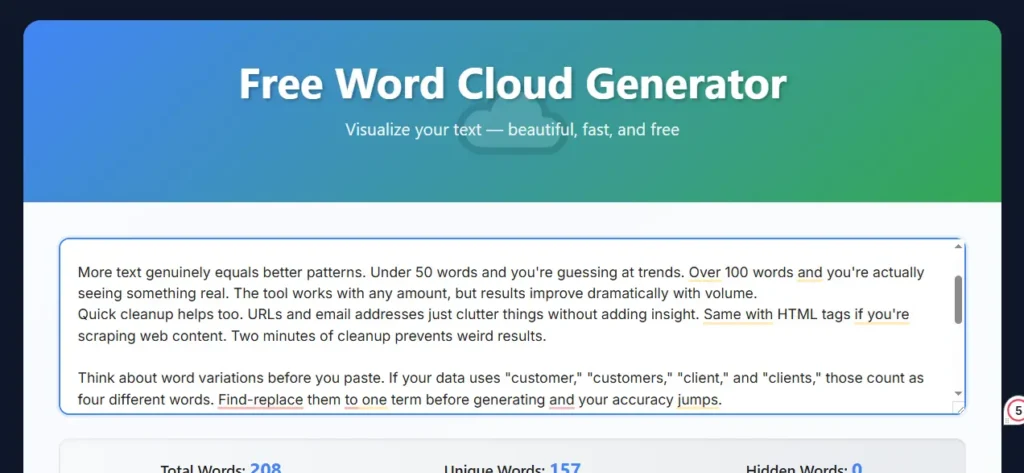
Copy whatever you want to analyze—could be emails, reviews, meeting notes, your competitor’s homepage, whatever—and paste it into the box. The tool doesn’t care about formatting. Line breaks, weird spacing, random punctuation? It handles all of it.
Want good results? Throw in at least 50 words. You can use less, but it’s like making soup with one vegetable. Technically possible, just not that interesting.
Set Your Preferences
That slider for word quantity? It controls how many words actually show up. The default sits at 150, which works surprisingly well for most situations. Too many words and everything shrinks into unreadable territory. Too few and you’re missing potentially important stuff.
Shapes are mostly about aesthetics, honestly. Circles look professional and balanced. Squares feel modern. Triangles have this upward energy that works well for motivational content or growth metrics.
Kill the Filler Words
This is crucial. Turn on “Hide Common Words” unless you want “the” as your biggest word (spoiler: you don’t). The tool knows which words are meaningless in English and Dutch, so it cuts them automatically.
Got a bunch of numbers gunking up your results? “Remove Numbers” is your friend. Converting everything to lowercase? Also one click. These little filters make the difference between “meh” results and actually useful visualizations.
Make It Look Good
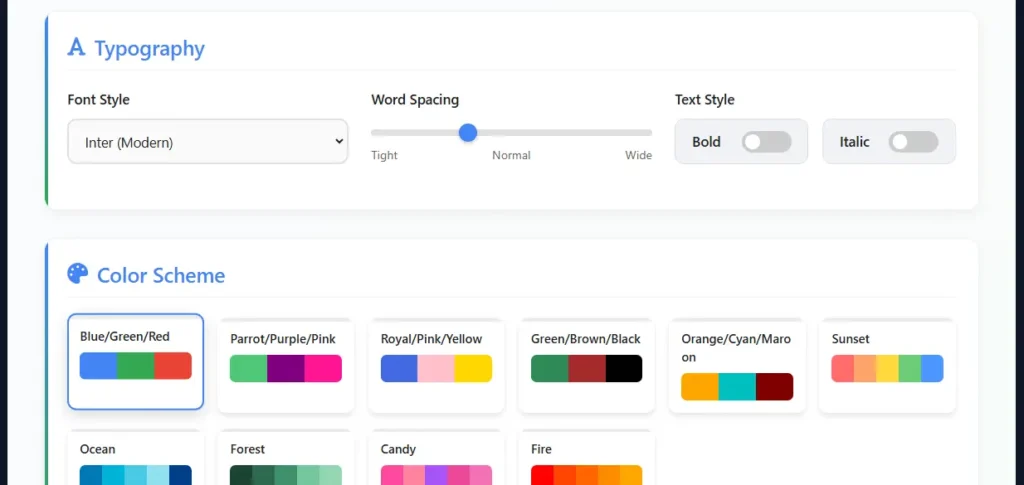
Six fonts to choose from. Inter’s clean and modern, perfect for business stuff. Impact practically screams at you—great for motivational quotes or attention-grabbing graphics. Georgia’s got that sophisticated vibe for academic work.
Play with word spacing if things feel cramped. The bold and italic toggles add visual punch when needed.
Choose Colors That Don’t Suck
Five pre-made color schemes save you from making terrible choices (we’ve all seen those neon-green-on-bright-pink disasters). Blue/Green/Red is your safe professional option. Parrot/Purple/Pink brings personality. Green/Brown/Black feels earthy and natural.
Real talk: color matters more than most people think. Use professional colors for work presentations. Save the wild stuff for creative projects or social media.
Generate Away
Hit Generate and watch it build your cloud. Layout looks weird? Regenerate shuffles everything around while keeping your colors and settings. Once you’re happy, download it. PNG works great for web stuff, JPG’s better when file size matters.
Decoding the Stats Panel
Those three numbers at the top aren’t just decoration. Total Words is exactly what it sounds like—how many words you pasted in. Unique Words shows vocabulary diversity.
Here’s where it gets interesting: if you’ve got 800 total words but only 60 unique ones, that means massive repetition. Which actually creates striking word clouds because a few words absolutely dominate.
Hidden Words tells you how many got filtered out by your settings. See 200 hidden words? Your text was full of “the,” “and,” “of,” and other noise. Totally normal for casual writing.
What is a Word Cloud Generator?
Understanding Word Clouds
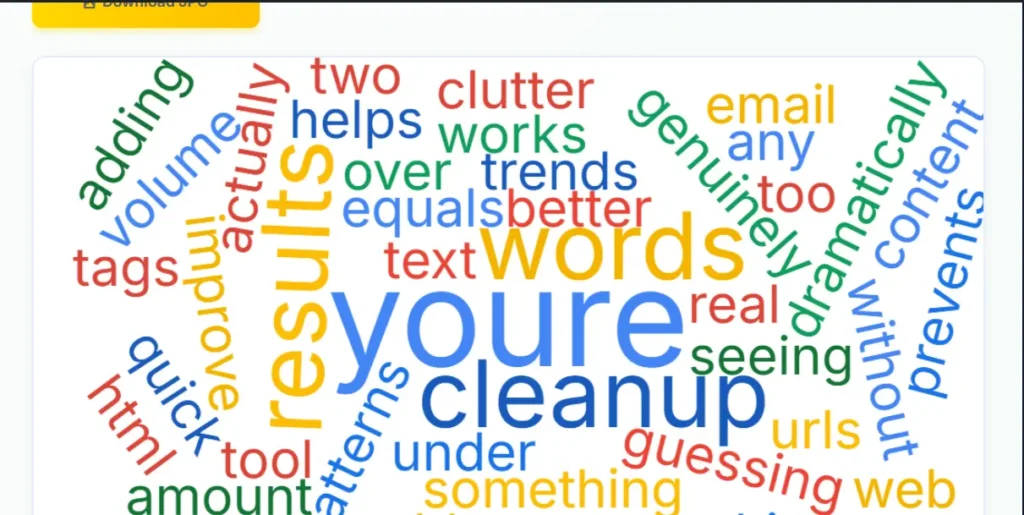
Picture this: you’ve got a thousand words of customer feedback. Some words pop up constantly—maybe “shipping” appears 47 times. Others show up once and never again. A word cloud makes the frequent stuff literally bigger so you can’t miss it.
People sometimes call these tag clouds, especially on websites where they’re used for navigation. But honestly? Same thing. The principle doesn’t change: frequency determines size.
Why does this beat traditional reading? Because you can glance at a word cloud for three seconds and know exactly what themes dominate your data. Try doing that with a spreadsheet or a 10-page document. You’ll be there all afternoon with a notepad and growing frustration.
Why Your Brain Loves Visual Data
Okay, this is kind of amazing: research shows our brains handle images something like 60,000 times faster than text. That’s not a metaphor—it’s actual neuroscience.
Think about how you normally analyze text. You read, maybe take notes, try to remember what you saw in document #12 when you’re now on document #47. You’re basically holding all this information in your head and hoping patterns emerge. Exhausting, right?
Word clouds flip that entirely. Patterns jump out immediately. If you’re analyzing product reviews and “broken” appears massive in your cloud, you don’t need a meeting to discuss next steps. The problem’s staring you in the face.
Plus—and this matters for presentations—word clouds speak to everyone. Your CEO might not care about your pivot table, but show them a word cloud where “customer service” dominates feedback? They get it instantly.
Real-World Uses That Actually Make Sense
For Business and Marketing
Ever have a boss ask “what are customers saying about us?” and you’re facing 400 reviews? Word cloud that thing. Five seconds later you know whether “shipping,” “quality,” or “price” is your main conversation topic.
Social media managers use these constantly. Grab all the comments from your latest campaign, generate a cloud, and actually see how people talk about your brand. Not how you hope they talk about it—how they actually do.
Competitor stalking gets easier too. Scrape their website copy or customer reviews, visualize it, and spot the gaps. They’re pushing features while customers care about benefits? That’s your marketing angle right there.
In Education and Research
Teachers love these for making boring stuff interactive. Have 25 students each contribute words about the Industrial Revolution, throw them all into a word cloud, and suddenly you’ve got a visual representation of class consensus. Way more engaging than raising hands.
Researchers doing literature reviews can dump 50 paper abstracts into the generator and immediately see which concepts own their field. Beats manually tracking themes with highlighters and sticky notes.
Also? Word clouds save presentations from death-by-bullet-points. Slide after slide of text puts people to sleep. Break that up with a well-designed cloud and suddenly people are leaning forward again.
For Content and SEO Strategy
Content writers paste drafts into this before publishing. Sometimes you’re writing about one thing but actually talking more about something else. The word cloud shows you—often uncomfortably clearly—what your content really emphasizes.
Keyword research becomes visible. Check what words dominate competitor content that’s ranking well. If everyone’s using terms you’re missing, you’ve found your optimization targets.
Analyzing your own best-performing content works the same way. Turn your top 10 blog posts into word clouds and patterns emerge. Those patterns become your content strategy template.
Personal Projects
People get creative with these. Word clouds from wedding vows for ceremony programs. Analysis of favorite books for custom wall art. Resume skills sections turned into portfolio graphics.
Social media year-in-review posts practically write themselves. Dump a year’s worth of your posts into the generator and see what themes defined your content. Makes for surprisingly shareable graphics.
Birthday cards with word clouds built from text messages between friends. Retirement gifts showing words that defined someone’s career. The personal applications are kind of endless once you start thinking about it. If you enjoy creative text tools, try our free ambigram generator to turn words into mirror-image art.
Tips for Better Results
Prep Your Text Right
More text genuinely equals better patterns. Under 50 words and you’re guessing at trends. Over 100 words and you’re actually seeing something real. The tool works with any amount, but results improve dramatically with volume.
Quick cleanup helps too. URLs and email addresses just clutter things without adding insight. Same with HTML tags if you’re scraping web content. Two minutes of cleanup prevents weird results.
Think about word variations before you paste. If your data uses “customer,” “customers,” “client,” and “clients,” those count as four different words. Find-replace them to one term before generating and your accuracy jumps.
Design Smart, Not Hard
That word quantity slider? Don’t max it out just because you can. More words means everything shrinks. Most people can process maybe 50-75 words at a glance. Past that and your cloud becomes visual noise instead of insight.
Color contrast beats “looking pretty” every time. Sure, pastel colors seem sophisticated, but can you actually read them? High contrast works for everyone, including people with vision problems. Accessibility isn’t optional.
Match your design to your audience or risk looking ridiculous. Comic Sans at a board meeting? Bold choice, probably wrong choice. Impact font on a children’s classroom poster? Perfect.
Avoid These Traps
Not filtering stopwords is the classic beginner mistake. You’ll get “the” as your dominant word and learn absolutely nothing. Always enable this unless you have a really specific reason not to. Trying to show everything in one cloud backfires. If 500 words are all “equally important,” none of them stand out. Be ruthless about what you include. Less is genuinely more here.
Wrong audience consideration ruins otherwise good work. Internal analysis can handle jargon and complexity. Client-facing stuff needs simplicity. Know who’s looking at your cloud before you make design decisions.
Why This Generator Stands Out
Actually Free Forever
No trials, no premium tiers, no “unlock advanced features” nonsense. Everything works for everyone all the time. Make 100 clouds today. Export all of them at full resolution. Use them however you want. Still free tomorrow. Browse all our free online generator tools and find more ways to work smarter.
Your Data Stays Yours
Everything processes in your browser. Nothing gets uploaded to servers. Nothing gets logged. Close your tab and your data vanishes into the digital void. This makes it safe for confidential stuff—customer data, proprietary research, sensitive feedback, whatever.
Mobile Doesn’t Suck
Too many tools say “mobile friendly” and deliver hot garbage. This actually works on phones. The interface adapts properly. Buttons are actually tappable. You can make legit professional word clouds from your phone while waiting for coffee.
Zero Artificial Limits
Some tools give you three word clouds per day or cap you at 50 words. Not this one. Generate 50 clouds in an hour if that’s your thing. Process texts with thousands of words. Export everything at full resolution. There’s no countdown timer or daily reset.
Professional Quality Output
These aren’t toy visualizations for school projects (though they work great for that too). The export quality handles serious business presentations, academic publications, and professional portfolios. High resolution, clean rendering, proper anti-aliasing—all the technical stuff just works without you thinking about it.
Frequently Asked Questions
Do I really not need to sign up?
Really truly. No email, no password, no account. Open the page, start making clouds. That’s it. Feels weird in 2025, right? But that’s the deal.
Can I use these commercially?
Yep. Make word clouds for client work, marketing materials, products you’re selling, whatever. No licensing restrictions, no attribution required. Though if you want to tell people about the tool, nobody’s stopping you.
What’s the actual limit on words?
The cloud can display up to 1,000 words, though 150-200 usually gives cleaner results. The tool processes texts of any length—it just shows the most frequent words up to whatever limit you set.
Why does regenerating give me different layouts?
The algorithm fits words together like puzzle pieces, and there are multiple ways to solve that puzzle. Your words and their sizes stay identical—just the arrangement shifts. Actually handy because you can keep regenerating until you get a layout that looks perfect.
Does this work on my ancient iPad?
If it runs a modern browser (Chrome, Safari, Firefox, whatever), it’ll work. The tool isn’t demanding. No special requirements, no need for the latest hardware.
Is my sensitive company data actually safe?
Completely. Client-side processing means your text never leaves your device. No servers, no databases, no logs. Perfect for analyzing confidential feedback, proprietary research, or anything else you wouldn’t want floating around the internet.
Can I make custom color schemes?
The five preset schemes cover most needs—professional, creative, natural, bold, etc. They’re designed to provide good contrast and visual appeal without letting people make terrible color choices (you know who you are).
What about languages other than English?
Works with any language—just paste it in. Stopword filtering currently handles English and Dutch. For other languages, you can still make clouds; you just won’t get automatic common-word removal.
How do I get high-res exports?
Download as PNG, and you’re automatically getting high resolution. Suitable for printing, large displays, whatever you need. No special settings required.
Do my settings save between visits?
Nope, since the tool doesn’t use cookies or accounts. But honestly, most people figure out their preferred settings pretty quick and can recreate them in like 30 seconds next time.
Ready to See What Your Text Is Really Saying?
Word clouds cut through the noise. Whether you’re drowning in customer feedback, planning content strategy, teaching a class, or making something personal, they reveal patterns that would otherwise stay buried in paragraphs.
This tool removes every excuse. Free, private, instant. No learning curve, no commitment, no catch. Paste text, click a button, see what happens.
Start simple—grab a recent email thread, an article you like, or feedback you’ve been meaning to analyze. Play around. Try different colors. Regenerate a few times. You’ll figure out pretty fast how useful this actually is.
Your insights are already in there. Just need to make them visible. Curious about the people behind this tool? Find out About us